Case Study
Creating a Product

The Product
The Paraverse product is a groundbreaking innovation led by the SPZ Paraplegic Center based in Luzern, Switzerland, and the Augment IT team.
The idea for this project came from the client who noticed a dire need for paraplegic patients to be able to communicate with loved ones and use the web and other useful application without the constant need of assistance and help by caregivers.
The AR devices already on the market were tested to find the true match that would satisfy the need of using solely eye interaction to communicate with the applications and perform basic tasks.
Due to the inability of the patients to move their hands, the eye interaction method was the preferred mode of interaction that allowed this group of users to navigate the web freely and privately.
The product is still in development and since it started has gained a lot of attention and proven to be useful for this group of users. Therefore, the proof of concept stage has now turned into product development.
The product has won a few design awards, including:
Best of Swiss App 2023
German Innovation Award 2024
Immersive Learning Award 2024 and a design
award from Core77.
I also wrote an article specifically on the topic of Eye Gaze interaction whic you can find here.
My Role
Senior Product Designer and Design Lead
My role on the product was to be responsible for all of the design decisions on the product and combine user needs with business goals.
This product is also a multi-platform product and runs on two devices. Magic Leap for the patient group and tablets for the caregivers.

Idea


Since the product itself was so specific and unique, there was a need to familiarize ourselves with the problems these users faced. Their mental state at the first moments in the hospital after their injury played a huge role in the process of designing the user flow of the product. The initial research was done by sifting through medical papers about the condition, how it can affect different areas of the spine, and how it affects the people who were injured. Additionally, there were important studies done to reflect the mental state of patients who are going through paralysis caused by injuries. We had a huge benefit of being able to consult with the staff at the SPZ Paraplegic center, who offered a lot of useful information, as well as conducting testing and interviews with the patients. This direct approach to the end users shaped the product and is still the best source of information for future development stages.

Interaction Method: Eye Gaze
Device: Magic Leap 2 (for patients)
Device: Android Tablets (for caregivers)
The Challange


The main challenges that we faced at the beginning were to move from the POC phase and assess if the product hold value and is usable for the end users.
We reviewed different devices that had eye gaze interaction capabilities based on the ease of use as well as the level of comfort. Among the devices tested, some proved to be a good eye gaze interaction candidate but were too heavy for the users and not comfortable to wear for a longer period of time.
The Magic Leap 2 device proved to be the best choice for the users and fit all of the conditions needed to fit the product and use case. Along with that came the limited information about eye gaze interaction and similar products in order to create a seamless experience.
Eye gaze as an interaction method is fairly used in every day products, and applications and only a few products exist on the market that use this technology for navigation. Finding the right resources and optimal elements, visualization, and time to navigate through the UI still a work in progress.
Main challenges:
Find the right Hardware
Create seamless Eye Gaze Interaction
Optimize the Layout
Protect Users Privacy
Phases


The first thing I did was set up a small team workshop. I gathered all of the information that I had and tried to lead the team into a brainstorming session. We discovered additional potential problems and tried to find the right solution. Then we also analyzed what is available as a resource that we can already utilize so that we can keep the scope within the budget frame.
Phase I
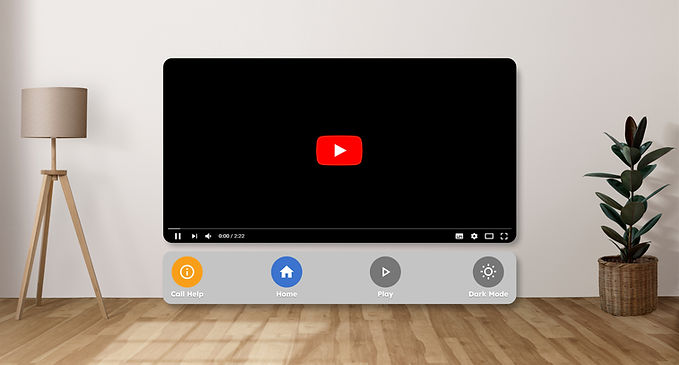
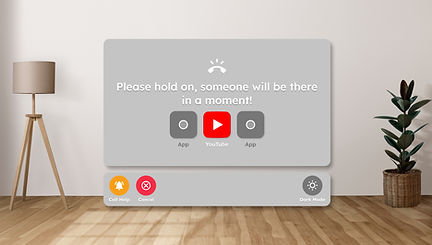
The first phase was the key to proveing if the product will work on the chosen device and if it has real value for people with paraplegia. The task was simple. Design the Home Screen and one available application. The chosen one was YouTube with hardcoded videos that can be played with simple commands. Additionally, add a contact call option so that the users may call for assistance at any time.
Home Screen & YouTube Flow


Support Call

Phase II
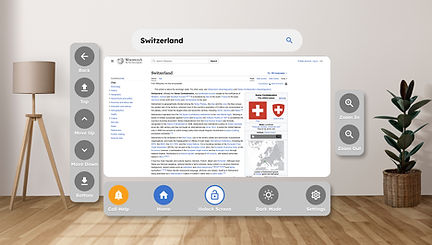
Once the first phase was a complete success, we moved on to the second phase, with a budget increase (woohoo). In this phase we added two important applications. The full YouTube experience as well as a Browser. Now our users are able to do something online. They could search and find a YouTube video just by using their eyes, and they could also browse the web through Google Chrome. The key challenges here were finding the right keyboard layout and timing the trigger for the execution of the interaction. Some users have bigger problems with their vision, so this poses a big challenge. We tested this directly with the users to make sure we get the timing right. The hover was activated after 0.5 seconds, and the trigger was activated after 0.5 seconds.

Browser Flow


Phase III
During phase three a lot of improvements were done. Especially to the keyboard. We added suggestions
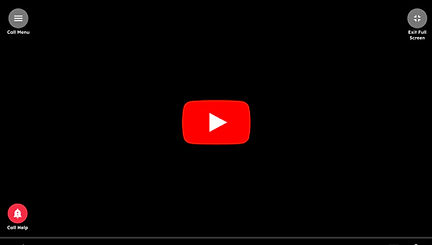
YouTube Flow Updated


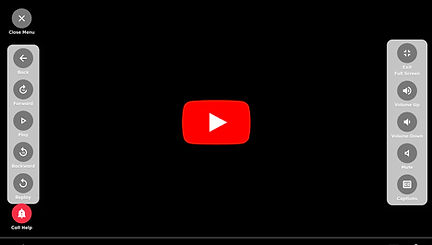
Phase III
In phase three, there was some additional improvements to the keyboard. Namely, the keyboard became more accessible to a wider group of users with the addition of the voice-to-text option, as well as word suggestions that helped users enter their search terms more quickly. Added functionality was also the Lock Screen option which allows users to turn off the eye gaze so they can watch a video without accidentally triggering an action.
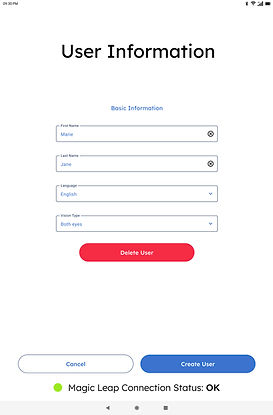
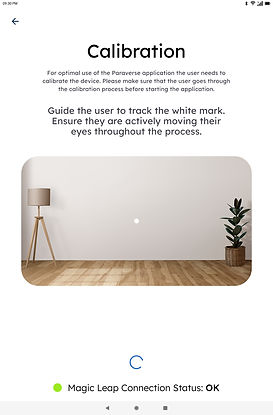
Additionally, the need for a second supportive application for the caregivers was becoming evident. The supportive application set up on Android tablets and will be used by a caregiver who will set up the device on the patient's head and help them navigate through the Paravers. If needed, they will be there to support them at all times. With this application came two important flows for User Setup and User Onboarding.
With this came the setup on the device as well.
Keyboard Accessibility Improvements


Lock Screen Functionality


Device Setup and Introduction


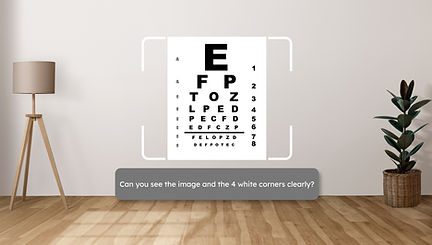

Adding & Deleting Users




Setting Up Device




Phase IV
In the latest phase of development, there was a limited budget to add only two additional features. One was to add a new application, WhatsApp. The users will be able to log into their accounts and chat with friends and loved ones. The caregivers will only support the setup, but they will not be able to see anything the patient is doing after that. So full privacy is guaranteed.
Another easy and simple application was added so that patients can additionally chat with the caregivers directly in case they need any help. It's called Direct Communication and allows patients to send a quick message to the caregiver.
WhatsApp Flow - Magic Leap


Direct Communication - Magic Leap


WhatsApp Flow - Tablet


Direct Communication - Tablet


The Outcome
The product is still in development. The main thing was that this proved to be a useful product for people with paraplegia. Especially in the early days in the hospital. The product offers them a sense of normality in one of the most sensitive and difficult periods in their lives.
One patient said:
"Paraverse came at the right moment for me. I was feeling deeply depressed after my accident, and Paraverse helped me feel a little bit like myself again."